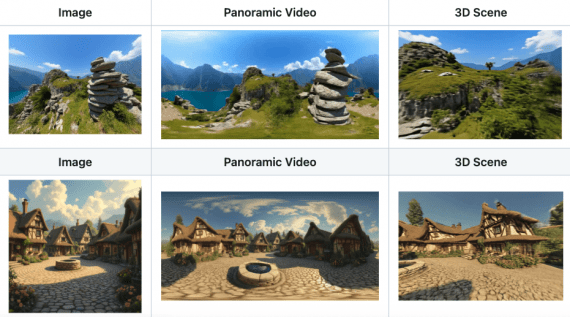
Researchers from Shanghai AI Laboratory and Fudan University published Yume1.5 — a model for generating interactive virtual worlds that can be controlled directly from the keyboard. Unlike regular video generation, you can move through virtual space using WASD keys (like in games) and rotate the camera with arrow keys. The model creates infinite video worlds from a single image or text description. The key achievement is a speed of 12 frames per second on a single A100 GPU, which is 70 times faster than previous solutions. The code to run the model is published on Github, and model weights will be released later.
Existing Solutions and Their Problems
Before Yume1.5, there were already attempts to create interactive worlds. Genie from DeepMind generates 2D worlds with action control, GAIA-1 from Wayve specializes in realistic driving simulations, and WORLDMEM uses memory to maintain consistency in long videos. Matrix-Game from Skywork AI creates interactive game worlds with keyboard control, and the original Yume also supports camera control.
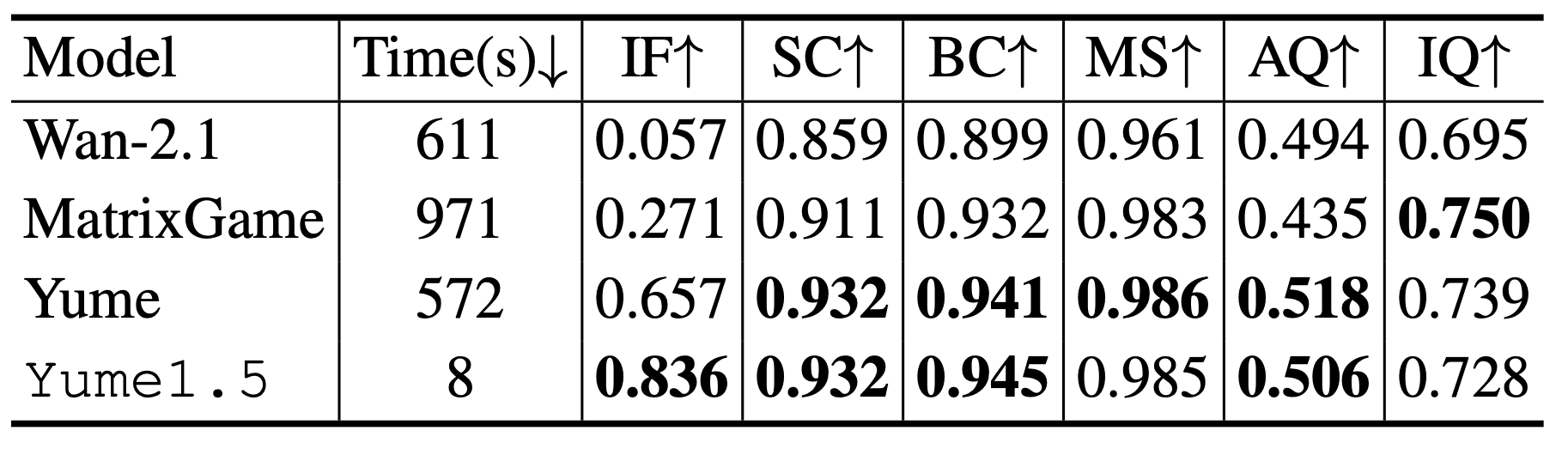
The problem is that these models are either too slow or struggle with realistic scenes. Wan-2.1 generates video in 611 seconds with very low command-following accuracy (0.057 on the Instruction Following metric). Matrix-Game is even slower at 971 seconds, though accuracy is better (0.271). Even the previous Yume version, which showed the best accuracy result (0.657), requires 572 seconds for generation. All these models use 50 diffusion steps, making them unsuitable for real-time interactive exploration.
The main problems of existing approaches: training on game datasets creates a gap with real urban scenes, high computational cost prevents real-time generation, and lack of text control doesn’t allow dynamically adding events to the world.
Three Operating Modes
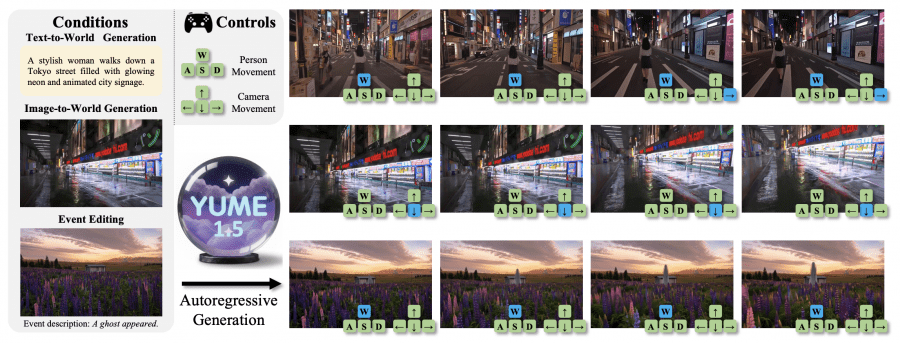
Yume1.5 supports three ways to create worlds. In text-to-world mode, the model generates a world from a text description — for example, “a stylish woman walks down a Tokyo street with glowing neon signs”. In image-to-world mode, it turns a static image into an explorable world. The third mode is event editing through text, where you can add a new event to an already created world like “a ghost appeared”. In all modes, control is through continuous keyboard input — WASD moves the character, arrows control the camera.
How TSCM Works
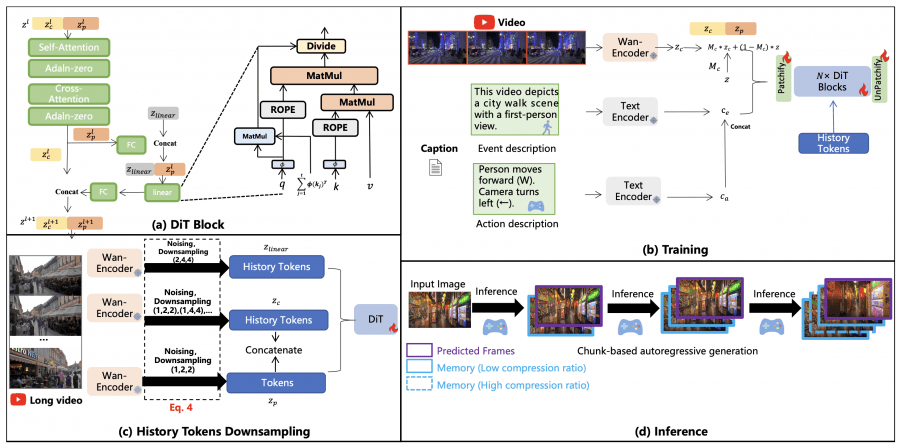
When the model generates a long video, the number of previous frames constantly grows, creating a huge computational load. TSCM (Temporal-Spatial-Channel Modeling) solves this problem through two parallel types of compression. For temporal-spatial compression, historical frames are downsampled at different rates: recent frames are compressed less (1, 2, 2), older ones more strongly (1, 4, 4) and (1, 8, 8). Simultaneously, for channel compression, the same frames are compressed to 96 channels. The first stream is processed by standard attention, the second by linear attention.
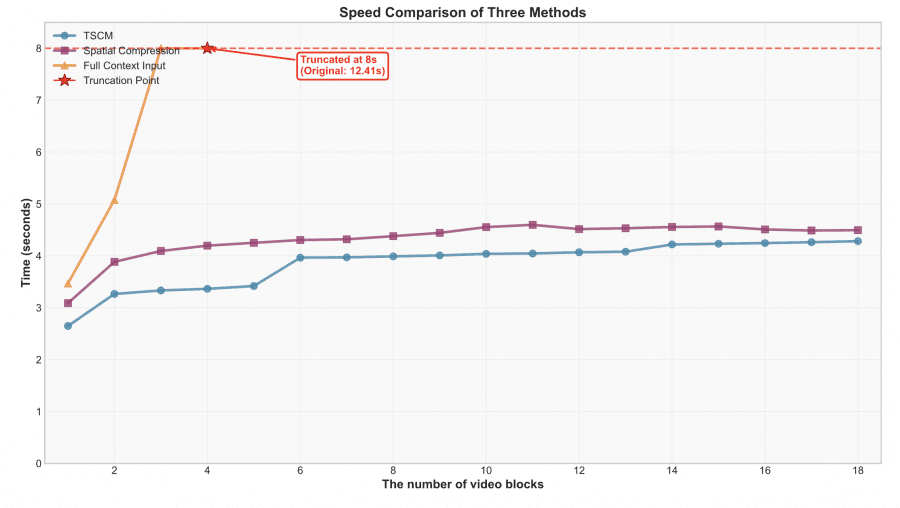
Comparison showed the effectiveness of the approach. When generating 18 video blocks, TSCM inference time stabilizes after 8 blocks at around 1.5 seconds. With spatial compression, it grows to 3 seconds. Full context would take 12.41 seconds by the 18th block.
Acceleration Through Self-Forcing
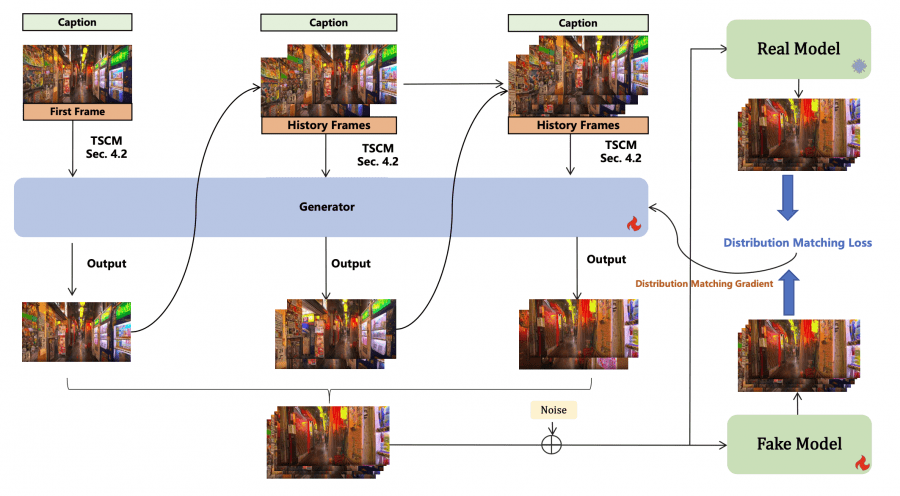
Yume1.5 uses distillation for acceleration: a “fast” model (student) learns to replicate the trajectory of a “real” model (teacher) by minimizing distribution divergence. The key difference is that the model uses its own generated frames as context, not real data. This reduces the gap between training and inference. The result is 4 inference steps instead of 50 while maintaining quality.
Datasets
Three types of data were collected for training. The main one is Sekai-Real-HQ with camera trajectories converted to keyboard commands. The dataset was re-annotated differently: for text-to-video, scene descriptions were kept, for image-to-video, event descriptions were created through InternVL3-78B. They added 50,000 synthetic videos to preserve general capabilities and 4,000 videos of specific events.
Results
Yume1.5 scored 0.836 on the Instruction Following metric, significantly ahead of Wan-2.1 (0.057), Matrix-Game (0.271) and Yume (0.657). At the same time, speed is only 8 seconds per test versus 572-971 for competitors. For 30-second videos, Aesthetic Score in the last segment is 0.523 versus 0.442 without Self-Forcing, Image Quality is 0.601 versus 0.542.
Limitations
The model shows artifacts: cars driving backwards, characters walking in reverse, quality drops with high crowd density. The authors attribute this to the limited capacity of the 5 billion parameter model and are considering Mixture-of-Experts (MoE) architectures as a solution to increase parameters without increasing inference time.
Main conclusion: Yume1.5 shows a path to creating interactive virtual worlds in real-time through efficient context compression and distillation. A speed of 12 fps makes the technology practically applicable for exploring virtual spaces.