What Is Gamma?
Gamma is an AI-powered tool that helps users create presentations, documents, and web-style content from prompts. It is known for its clean visual style, fast generation, and modern storytelling format.
For many users, Gamma is useful because it removes the blank-page problem. You can type a topic, and the tool generates a structured, visual presentation quickly. It is especially good for async sharing, startup ideas, educational explainers, and modern web-based presentations.
However, Gamma is not perfect for everyone. Some users need more control over PowerPoint editing. Some want traditional business slides. Others need tools that can convert files like Word, PDF, Excel, images, or HTML into PPT decks. That is why many users look for Gamma alternatives.
Why Look for a Gamma Alternative?
Gamma is a strong tool, but it may not match every presentation workflow.
One common reason is PowerPoint compatibility. Many companies still rely on PPTX files for editing, sharing, presenting, and internal collaboration. If your final deck needs to be edited in PowerPoint, a tool focused on editable PPT workflows may be more practical.
Another reason is presentation style. Gamma often feels more like a visual web document than a traditional slide deck. This can be great for storytelling, but less ideal for formal business presentations, consulting decks, internal reports, or client-facing slides.
Some users also need more input options. Instead of starting from a prompt, they may want to convert a Word document, PDF, spreadsheet, screenshot, or web page into a presentation. In these cases, a Gamma alternative with dedicated content-to-PPT tools can save more time.
1. Dokie AI
Best for: Editable, business-ready PowerPoint presentations
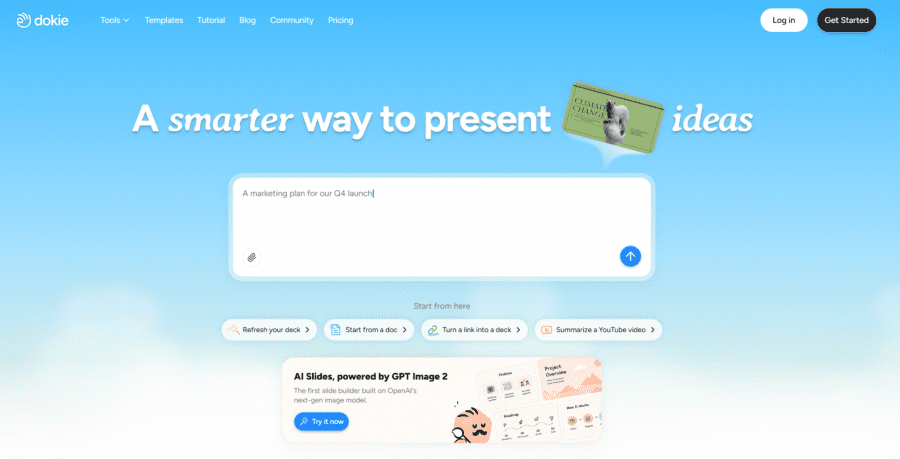
Dockie AI is one of the best Gamma alternatives for users who need practical, structured, and editable slide decks. While Gamma is great for visual storytelling, Dokie AI focuses more on real presentation workflows, especially for users who want to create decks they can export, edit, and present in PowerPoint.
Dokie AI is especially useful for business reports, marketing updates, pitch decks, client presentations, training materials, sales decks, and internal meeting slides. It helps users generate complete presentations from prompts or existing content, then refine the structure and export the final deck.
A key advantage of Dokie AI is that it offers multiple AI PPT tools for different content sources. Instead of only generating slides from a prompt, users can turn existing materials into presentations.
Key Dokie AI tools
Text to PPT
Turn notes, outlines, ideas, or rough text into a complete presentation.
Word to PPT
Convert documents, reports, proposals, and long-form drafts into structured slides.
PDF to PPT
Summarize PDF files and turn them into presentation decks.
Excel to PPT
Transform spreadsheets, data tables, reports, and performance summaries into slides.
JPG to PPT and PNG to PPT
Convert screenshots, diagrams, visual notes, and image-based content into presentation slides.
HTML to PPT
Turn web pages, landing pages, HTML content, or structured online materials into PPT decks.
Why Dokie AI is a great Gamma alternative
Dokie AI is a better fit if you care about editable PowerPoint output, traditional deck structure, and business presentation use cases. It is especially useful when you already have source materials and want to convert them into a clear, professional presentation.
2. Canva
Best for: Design flexibility and visual customization
Canva is a strong Gamma alternative for users who care most about visual design. With Canva’s AI presentation tools, templates, brand kits, icons, images, and design assets, users can create polished presentations quickly.
Canva is especially useful for marketers, creators, educators, social media teams, and small businesses. It gives users much more control over the look and feel of a deck. If you want to customize colors, fonts, layouts, graphics, and brand elements, Canva is one of the easiest tools to use.
Compared with Gamma, Canva is less focused on web-style storytelling and more focused on visual editing. It may require more manual adjustment, but it gives users more creative control.
Why choose Canva over Gamma?
Choose Canva if you want a huge template library, easy visual editing, and stronger control over presentation design.
3. Beautiful.ai
Best for: Consistent team presentations
Beautiful.ai is a Gamma alternative designed for users and teams that want polished, consistent presentations. Its smart slide system helps keep layouts clean and prevents messy design choices.
This is useful for companies that create a lot of recurring decks, such as sales presentations, business reports, pitch decks, training materials, and marketing updates. Beautiful.ai is especially helpful when multiple team members need to create decks while staying on brand.
Compared with Gamma, Beautiful.ai feels more structured and controlled. Gamma may be better for creative storytelling, while Beautiful.ai is better for teams that want professional consistency.
Why choose Beautiful.ai over Gamma?
Choose Beautiful.ai if your team needs clean, branded, and consistent presentations without relying on everyone to be a designer.
4. Tome
Best for: AI storytelling and visual narratives
Tome is another popular alternative to Gamma. Like Gamma, it focuses on storytelling, visual content, and AI-assisted creation. It is useful for founders, product teams, creators, and educators who want to explain ideas in a modern format.
Tome works well for concept decks, startup stories, product narratives, creative pitches, and educational explainers. It is less traditional than PowerPoint and more focused on creating a visual flow around an idea.
Compared with Gamma, Tome may feel more narrative-first. If your main goal is to communicate a story, pitch a concept, or create a visually engaging idea deck, Tome can be a good option.
Why choose Tome over Gamma?
Choose Tome if you want an AI storytelling tool for visual narratives, product stories, and creative presentations.
5. Plus AI
Best for: Google Slides and PowerPoint workflows
Plus AI is a strong Gamma alternative for people who want to create and edit presentations inside tools they already use, such as Google Slides and PowerPoint.
Instead of moving your workflow into a separate AI presentation platform, Plus AI works inside familiar slide editors. This makes it useful for consultants, analysts, business teams, teachers, and professionals who already have existing templates or company slide formats.
Plus AI can help users generate new decks, rewrite slides, improve existing presentations, and adjust content structure. It is especially practical for users who do not want a web-style presentation tool and prefer to stay close to traditional slide software.
Why choose Plus AI over Gamma?
Choose Plus AI if you want AI slide generation inside Google Slides or PowerPoint instead of creating presentations in a separate platform.
6. Microsoft Copilot for PowerPoint
Best for: Microsoft 365 users
Microsoft Copilot for PowerPoint is a natural Gamma alternative for users who already work inside Microsoft 365. It can help create, rewrite, summarize, and improve presentations directly in PowerPoint.
The biggest advantage is workflow fit. Many companies already use PowerPoint as their standard presentation tool. With Copilot, users do not need to export from another platform or adapt to a different interface.
Copilot is especially useful when your content already exists in Word documents, meeting notes, emails, or internal files. It can help turn those materials into slides and improve presentation content within the Microsoft ecosystem.
Why choose Microsoft Copilot over Gamma?
Choose Microsoft Copilot if your team already uses PowerPoint and Microsoft 365 as the main work environment.
7. Pitch
Best for: Collaborative team decks
Pitch is a presentation platform built for modern teams. It combines slide creation, collaboration, templates, brand controls, and AI-assisted workflows.
Pitch is useful for startups, sales teams, marketing teams, and product teams that create decks together. It is not just an AI slide generator; it is also a team workspace for creating and managing presentations.
Compared with Gamma, Pitch may be a better choice for teams that need collaboration, shared templates, and brand consistency. Gamma is great for fast visual generation, while Pitch is stronger as a presentation workspace.
Why choose Pitch over Gamma?
Choose Pitch if your team needs to collaborate on decks and maintain brand consistency across presentations.
8. Presentations.AI
Best for: AI-generated business presentations
Presentations.AI is a Gamma alternative focused on creating professional presentations with AI. It can help users generate decks from ideas, documents, data, and business content.
This tool is useful for users who want AI to handle more of the presentation creation process, from structure to design. It is suitable for pitch decks, proposals, reports, training decks, and business presentations.
Compared with Gamma, Presentations.AI may feel more business-oriented. It is a good option for users who want a dedicated AI presentation maker rather than a general visual storytelling platform.
Why choose Presentations.AI over Gamma?
Choose Presentations.AI if you want an AI-first tool for generating professional business decks from different types of content.
How to Choose the Best Gamma Alternative
The best Gamma alternative depends on what you need from a presentation tool.
If you want editable PowerPoint decks and a practical business workflow, Dokie AI is one of the best choices. It is especially useful if you need to convert text, Word documents, PDFs, Excel files, images, or HTML content into PPT slides.
If you care most about design freedom, Canva may be the better option. If your team needs consistent branded decks, Beautiful.ai or Pitch can be a good fit. If you already work in PowerPoint or Google Slides, Plus AI or Microsoft Copilot may be more convenient. If you want narrative storytelling, Tome is worth considering.
The key is to choose a tool based on your final output. A good AI presentation tool should not only generate attractive slides. It should also help you create a deck that is easy to edit, present, and share.
Final Verdict
Gamma is a great AI presentation tool, especially for visual storytelling and web-style content. However, it is not always the best option for users who need traditional slide decks, editable PowerPoint files, or business-ready presentations.
For those users, Dokie AI is one of the best Gamma alternatives. It offers a more practical workflow for creating structured, editable PPT decks and includes useful tools like Text to PPT, Word to PPT, PDF to PPT, Excel to PPT, JPG to PPT, PNG to PPT, and HTML to PPT.
Other tools like Canva, Beautiful.ai, Tome, Plus AI, Microsoft Copilot, Pitch, and Presentations.AI are also strong alternatives, depending on your workflow. The best choice depends on whether you need design flexibility, storytelling, collaboration, or professional PowerPoint-ready output.