Video production has always demanded a careful balance between creative vision and technical execution. For years, achieving smooth, realistic motion in AI-generated video meant wrestling with inconsistent outputs, repeated generation attempts, and hours of post-production cleanup. The results were often unpredictable — a character’s walk cycle would drift, a hand gesture would blur, or the subject’s identity would shift between frames.
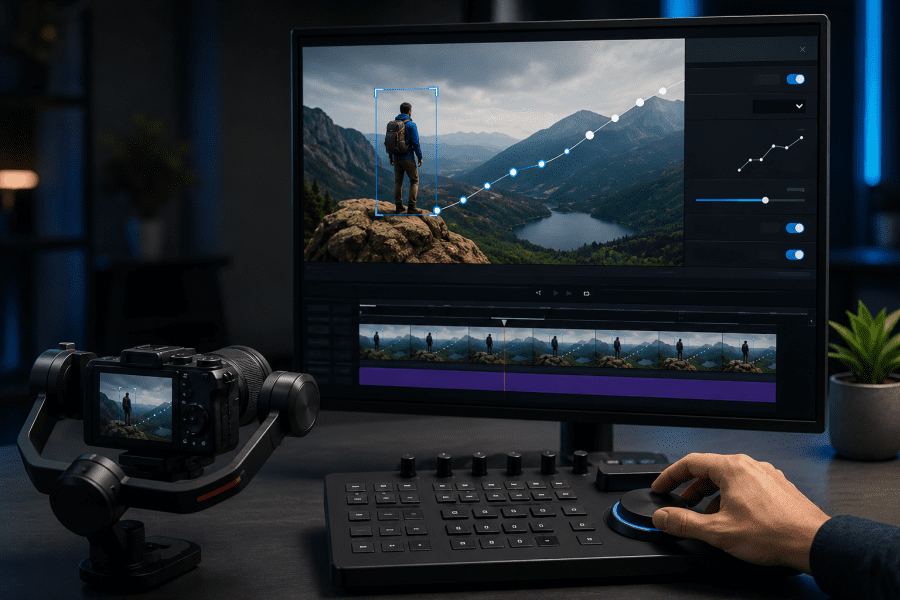
AI motion control changes this equation entirely. Instead of relying on text descriptions alone to guide movement, modern motion control systems extract precise pose and flow data from a reference clip and apply it to any target image. The result is frame-accurate motion that stays true to both the original choreography and the subject’s visual identity.
This guide walks through what AI motion control is, why it matters for video creators, and how to use it effectively — whether you’re producing short-form social content, brand campaigns, or independent film projects.
What Is AI Motion Control and Why It Matters
Motion in AI video generation has historically been one of the hardest problems to solve. Early text-to-video models could produce visually impressive single frames, but maintaining consistent, believable movement across a sequence was unreliable. A dancer might move fluidly for two seconds before the model lost track of limb positions. A speaker’s mouth might sync with audio for a moment, then drift out of alignment.
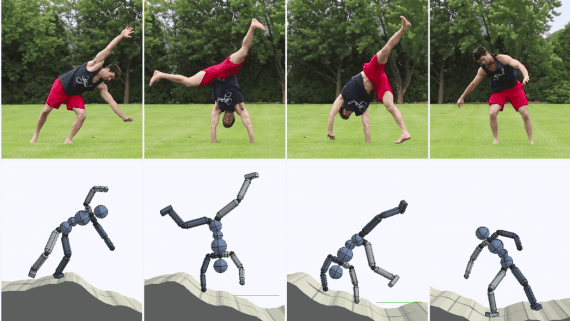
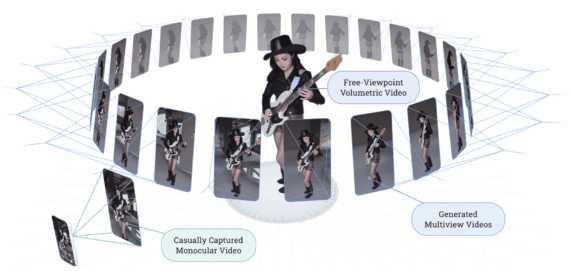
AI motion control addresses this by shifting the source of motion information. Rather than asking a language model to interpret phrases like “walks confidently” or “raises hand slowly,” a motion control system reads actual movement data from a reference video. It captures the trajectory of joints, the timing of gestures, and the spatial relationship between body parts — then maps all of that onto a completely different subject in a completely different visual style.
This approach produces results that are both more consistent and more controllable. Creators can shoot a simple reference clip with any performer, then apply that exact motion to a digital character, a product mascot, or a stylized illustration without any additional shooting.
From Text Prompts to Reference-Driven Motion
The shift from text-driven to reference-driven motion represents a fundamental change in how AI video tools work. With text prompts, the model makes probabilistic guesses about what a given action should look like. With a reference clip, it has ground truth to work from.
This matters most for complex, multi-part movements. Martial arts sequences, dance choreography, and detailed hand gestures are notoriously difficult to describe in text with enough precision to get consistent results. A reference clip captures all of that complexity automatically — the timing, the weight shifts, the micro-movements — without requiring the creator to write increasingly elaborate prompts.
The practical effect is a dramatic reduction in iteration time. Instead of generating dozens of variations hoping one captures the right motion, creators can shoot a single reference clip and get predictable, repeatable results on the first or second attempt.
Key Features That Make AI Motion Control Powerful
Understanding the specific capabilities of a motion control system helps creators use it more effectively. Modern implementations go well beyond simple pose transfer, offering tools for fine-grained control over individual body parts, camera movement, and even synchronized audio generation.
Motion Transfer and Pose Replication
The core capability of any motion control system is extracting pose data from a reference video and applying it to a target subject. This involves tracking the position and orientation of key joints — shoulders, elbows, wrists, hips, knees, ankles — across every frame of the reference clip, then using that data to drive the target subject’s movement.
What separates advanced implementations from basic ones is how well they handle edge cases: overlapping limbs, partial occlusion, rapid direction changes, and fine-grain articulation like individual finger movements. A system that handles these well can replicate complex choreography — full-body dance routines, detailed hand gestures, subtle facial expressions — with high fidelity across the entire sequence.
The identity preservation aspect is equally important. The target subject should maintain its visual characteristics throughout the motion sequence. A stylized character should stay stylized; a specific person’s face should remain recognizable. Motion transfer that compromises identity consistency creates uncanny results that undermine the creative intent.
Motion Tokens for Precise Control
Beyond full-body motion transfer, advanced systems offer granular control through a structured control language for adjusting specific aspects of movement without regenerating the entire sequence. These controls — sometimes called Motion Tokens — allow creators to fine-tune individual limbs, adjust camera movement parameters, and control micro-expressions like eye blinks, breathing rhythm, and subtle head tilts.
This level of control is particularly valuable when the reference clip captures the right overall motion but needs small adjustments to fit the target context. For example, a reference clip of someone walking might have the right pace and posture, but the arm swing might be too pronounced for the target character’s style. Token-based controls let creators dial back that specific element without affecting the rest of the motion, dramatically reducing the number of full regenerations needed to reach a final result.
Who Benefits Most from AI Motion Control
AI motion control is broadly useful, but certain use cases see the most dramatic productivity gains.
Short-form content creators working on platforms like TikTok, Instagram Reels, and YouTube Shorts face constant pressure to produce high-quality video at high volume. Motion control lets them shoot a single reference clip — a dance trend, a reaction, a product demonstration — and apply it to multiple characters or visual styles without reshooting. What might take a full production day can be compressed into a few hours.
Brand marketing teams benefit from the consistency and localization capabilities. A campaign that needs the same motion sequence performed by different regional spokespeople, or adapted to different visual styles for different markets, becomes far more manageable when motion can be transferred rather than re-performed. Kling AI’s platform supports this kind of workflow with integrated audio generation, so voice, sound effects, and ambience are produced in the same pass as the video — eliminating a separate sound design step.
Indie filmmakers and animators gain access to motion quality that previously required motion capture equipment and dedicated studios. A filmmaker can perform a stunt or action sequence themselves, then transfer that motion to a digital character — achieving professional results without professional infrastructure.
A Step-by-Step Guide to Getting Started
The workflow for AI motion control is straightforward once you understand what each step requires. Here’s how to approach it from reference clip to final output.
Preparing Your Reference Clip
The quality of your reference clip directly determines the quality of your output. Shoot against a clean, contrasting background — the motion extraction algorithm needs to clearly distinguish the subject from the environment. Busy backgrounds, low contrast between subject and background, or inconsistent lighting can cause tracking errors that show up as artifacts in the final video.
Keep the clip between three and thirty seconds. Shorter clips give the model less motion data to work with; longer clips can introduce drift as the model tries to maintain consistency across more frames. For most use cases, a clip in the five-to-fifteen-second range hits the right balance. Make sure the full body — or at least the relevant body parts — stays within the frame throughout the clip, since partial occlusion at the edges is one of the most common sources of motion artifacts.
Setting Up Your Target Image
Your target image needs to match the reference clip in a few key ways to get clean results. The subject should be in a neutral pose that’s compatible with the starting position of the reference clip. If the reference clip begins with the subject standing upright with arms at their sides, a target image showing the subject in a dramatically different starting pose will require the model to make a larger initial adjustment, which can introduce inconsistencies in the first few frames.
Resolution and image quality matter more than many creators expect. A high-resolution target image gives the model more detail to work with when maintaining identity consistency across frames. Low-resolution or heavily compressed images tend to produce outputs where fine details — facial features, clothing textures, hair — degrade over the course of the motion sequence. Style consistency between the reference clip and target image also helps, since a larger visual gap between the two requires the model to bridge more distance, which can affect output quality.
Running the Generation and Refining Results
With a clean reference clip and a well-prepared target image, the generation process itself is relatively straightforward. Upload both assets, review the default settings, and run the initial generation. Evaluate the first output against a few criteria: Does the motion match the reference clip accurately? Does the subject maintain its identity throughout the sequence? Are there any obvious artifacts — flickering, limb distortion, background inconsistencies?
If the motion is accurate but small details need adjustment, use token-based controls to address specific issues: tighten a hand gesture, smooth a camera movement, adjust the intensity of a facial expression. If the output has more fundamental issues — significant identity drift, major motion artifacts — it’s usually more efficient to revisit the reference clip or target image rather than trying to correct the output through tokens alone. A cleaner input almost always produces a better result than extensive post-generation correction.
The Practical Case for AI Motion Control
AI motion control represents a genuine shift in what’s possible for video creators working without large production budgets or dedicated motion capture infrastructure. By grounding motion generation in real-world reference data rather than text interpretation, it delivers consistency and precision that text-only approaches can’t match.
The workflow is accessible. A clean reference clip, a well-prepared target image, and a basic understanding of token-based refinements are enough to produce professional-quality results. The learning curve is shallow compared to traditional animation or motion capture pipelines, and the iteration cycle is fast enough to support high-volume production schedules.
For creators who need reliable, repeatable motion in AI-generated video, the combination of reference-driven motion transfer, fine-grained token controls, and integrated audio generation addresses the core production bottlenecks that have made AI video difficult to use at scale. The tools are here — the main variable is learning to prepare clean inputs and read the outputs accurately enough to know when to refine and when to move on.