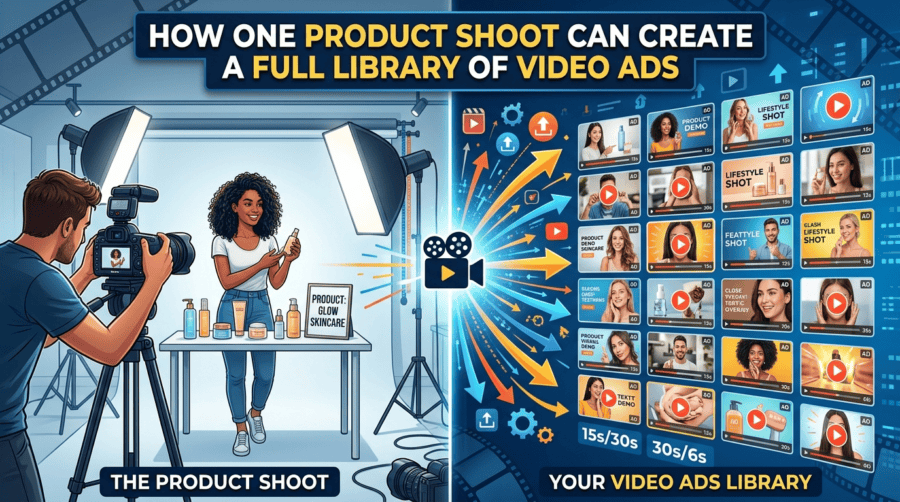
A product shoot often ends with a folder full of photos and a handful of video clips. The campaign goes live, a few ads are created, and much of the remaining footage eventually gets buried in a content library.
But a single product shoot can contain far more creative potential.
With the right workflow, the same footage can become product demonstrations, short social ads, testimonial-style videos, feature explainers, retargeting creatives, and variations for different audiences. AI is making it easier to turn one production day into an ongoing source of campaign content.
Think Beyond the Original Campaign
The first step is to stop treating a product shoot as a one-campaign asset.
A shoot captures multiple angles, product details, environments, demonstrations, reactions, and supporting footage. Those elements can be separated and recombined into different stories.
Build an Asset Map
Before creating new ads, organise the footage around what it communicates.
For example, a skincare shoot might include:
- Product close-ups
- Application footage
- Texture shots
- Packaging details
- Lifestyle scenes
- Before-and-after visuals
- Founder or creator footage
Each category can support a different advertising angle.
Turn the Shoot Into a Production System With Invideo Agent
Invideo agent can help turn a collection of product assets into multiple creative directions instead of treating the original edit as the final output.
Creators can provide existing footage, product information, scripts, brand material, PDFs, rough cuts, and other references and continue developing new video concepts from those inputs. The platform provides access to 200+ AI models and supports workflows across scripting, visual development, voiceovers, music, scene creation, editing, and AI video upscaling, helping creators improve the quality of existing footage as projects evolve.
With invideo agent two, the project can retain important creative decisions as new versions are developed. Teams can also create specialist agents for roles such as creative director, scriptwriter, or product marketer, allowing the same product footage to be approached from different campaign perspectives.
This can be especially useful when a brand wants to turn one shoot into a larger collection of ads rather than producing a new video for every campaign idea.
Find Multiple Stories Inside the Same Footage
A common mistake is to make every ad communicate the same message.
Instead, divide the product shoot into different customer stories.
Feature-Led Ads
One version can focus on a specific product feature.
For example, a luggage brand could create separate ads around its storage capacity, wheels, durability, or design. The same shoot may already contain enough footage to support each angle.
Problem-Solution Ads
Another version can start with a customer problem and introduce the product as the solution.
This approach changes the opening completely, even when the underlying product footage remains the same.
Lifestyle Ads
The same footage can also be edited around a particular lifestyle or use case.
A fitness product could be positioned around morning routines, travel workouts, home training, or beginner-friendly exercise rather than simply listing its features.
Create Different Hooks From One Product
The opening seconds of an ad can determine whether someone keeps watching.
Instead of using one introduction across every version, create several hooks from the same shoot.
Test the Question
Start with a question that addresses a customer concern.
“Still struggling to keep your desk organised?”
Test the Outcome
Lead with what the customer can achieve.
“Turn your workspace into a setup that works for you.”
Test the Product
Get directly to the product.
“This is the storage system designed for small spaces.”
The footage underneath can remain similar while the opening changes the entire direction of the ad.
Adapt One Shoot for Different Platforms
A product shoot should not be locked to one aspect ratio or platform.
The same material can become:
- Vertical short-form ads
- Square social creatives
- Website product videos
- YouTube ads
- Marketplace videos
- Retargeting creatives
Change the Edit, Not the Story
A vertical social ad may need quick cuts and captions, while a product-page video can spend more time explaining how something works.
The core footage remains useful, but the pacing, framing, text, and structure can change according to where the video will appear.
Build Audience-Specific Versions
Different audiences may care about different aspects of the same product.
A first-time buyer may need a basic explanation. Someone familiar with the category may care more about performance or a specific feature.
One Product, Several Messages
A brand can create separate versions for:
New customers: What the product does and why it is useful.
Comparison shoppers: What makes the product different.
Existing customers: Additional uses, upgrades, or complementary products.
This approach makes the content library more useful without requiring another physical shoot.
Use Customer Feedback to Guide New Ads
Your existing customers can also tell you what new versions should focus on.
Reviews, comments, support questions, and sales conversations often reveal the questions people have before buying.
Turn Questions Into Creative
If customers frequently ask whether a product is easy to use, create an ad that demonstrates the setup.
If durability is a common concern, build a version around testing or real-world use.
If customers do not understand one feature, create a short explainer around it.
This gives each new video a reason to exist rather than creating variations simply for the sake of volume.
Keep the Original Shoot Organised
The more variations you create, the more important asset management becomes.
Creative teams can use platforms such as Picflow to organise visual assets, manage different versions and keep campaign files accessible as the content library grows.
Keep original footage, selected clips, product images, voiceovers, graphics, scripts, and final exports clearly organised.
Create Reusable Content Groups
Consider grouping footage by:
- Product feature
- Customer problem
- Use case
- Location
- Product angle
- Audience
- Campaign
This makes it easier to return to the shoot weeks or months later and find material for a new campaign.
Build a Repeatable Ad Pipeline
The real benefit of this approach appears when it becomes a regular process.
Instead of:
Shoot → Create one campaign → Archive footage
you can build:
Shoot → Organise assets → Identify angles → Create variations → Test → Learn → Reuse
Performance data can then influence what you create next.
If a particular hook performs well, create more variations around it. If a feature-focused video gets stronger engagement, develop additional versions using the same footage.
Final Thoughts
A product shoot does not have to produce only one hero video and a few supporting assets. With thoughtful planning, the same footage can become a library of creative variations for different audiences, platforms, and campaign objectives.
AI makes this approach more practical by reducing the work involved in scripting, restructuring, editing, and adapting existing material.
Invideo agent can support this process by bringing 200+ AI models, project context, specialist agents, scripting, visual development, and editing into one workflow.
The goal is not simply to create more ads. It is to get more creative value from the production work you have already done and turn one product shoot into a content resource that can support campaigns long after the original launch.