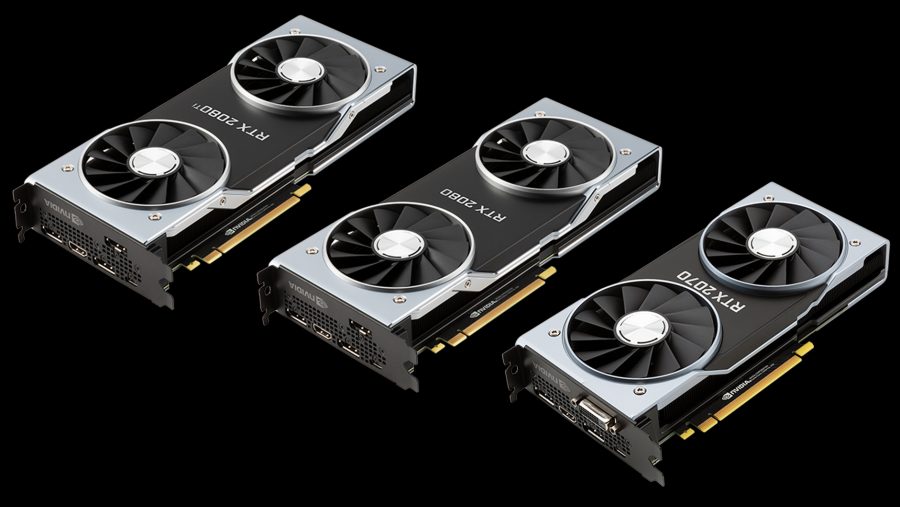
Deep learning runs on GPUs, and the right GPU decides whether an experiment takes minutes or days, and whether a model fits on your machine at all. In 2026 the choice is harder than ever: there are consumer graphics cards, workstation cards, compact “AI computers” with large unified memory, and data center GPUs that most people rent rather than buy, and a global memory shortage has pushed many prices far above their official levels.
This guide explains what actually matters in a GPU for AI, how much memory you need for training and for running LLMs locally, which GPUs make sense at each budget in late 2026, and when renting a cloud GPU is the better choice.
Key takeaways
- Memory (VRAM) comes first: it decides which models fit. A 32B LLM needs about 21 GB in 4-bit, a 70B model about 43 GB; full fine-tuning needs roughly 16 bytes per parameter.
- Bandwidth decides speed for LLM inference: every generated token reads all the weights, so tokens per second are capped by memory bandwidth divided by model size.
- NVIDIA is still the safe choice because of CUDA, but AMD ROCm, Apple MLX and Intel have become usable for many workloads.
- Prices in 2026 are distorted by the DRAM shortage: the RTX 5090 (MSRP $1,999) sold for $4,000 to $9,000 in the second half of 2026. Check current prices and consider used cards and the cloud.
- Train big models in the cloud: an H100 rents for roughly $2 to $7 per hour, which beats buying for occasional large jobs.
Why AI Needs GPUs
Training and running a neural network is mostly matrix multiplication: every layer multiplies its inputs by a weight matrix, and backpropagation does the same in reverse to compute gradients. A CPU has a few dozen powerful cores; a GPU has thousands of simpler ones and very fast memory, which makes it tens to hundreds of times faster at this kind of parallel arithmetic. Since 2017, GPUs have also had Tensor Cores, specialized units for matrix multiplication in low precision (FP16, BF16, FP8 and, since the Blackwell generation, FP4), which multiply the speed again.
A fast GPU lets you test ideas in hours instead of days and run more experiments, which matters as much as the final model. For running models, the GPU determines what you can use locally: a laptop GPU handles small models, a 24 GB card a capable 32B LLM, and a 70B model needs 48 GB or more.
What Matters in a GPU for AI
In rough order of importance:
- Memory capacity (VRAM). The model weights, activations, optimizer states and, for LLMs, the KV cache must fit in GPU memory. If they do not fit, you cannot run the job at all, or only very slowly with offloading. This is the first filter for any choice.
- Memory bandwidth. How fast data moves between memory and the compute units. Generating text with an LLM is bandwidth-bound: each new token requires reading all the weights once. Bandwidth also limits recurrent networks, small-batch inference and many training workloads.
- Tensor Core throughput and supported formats. Peak FP16/BF16/FP8/FP4 TFLOPS matter for training and for prompt processing. Newer generations support lower precision formats that roughly double throughput each step down, if your software uses them.
- Software ecosystem. PyTorch, JAX, vLLM, llama.cpp, Hugging Face and nearly every research codebase are developed on NVIDIA CUDA first. AMD ROCm now supports PyTorch and the main inference engines on recent cards, Apple MLX runs LLMs well on Macs, and Intel supports PyTorch through its XPU backend, but on non-NVIDIA hardware you will hit more rough edges.
- Power, cooling and size. A high-end card draws 450 to 600 W and needs a strong power supply, good case airflow and physical space.
The chart below places current GPUs and AI computers by the two numbers that matter most for LLMs. Capacity on the horizontal axis tells you which models fit; bandwidth on the vertical axis tells you how fast they will run:
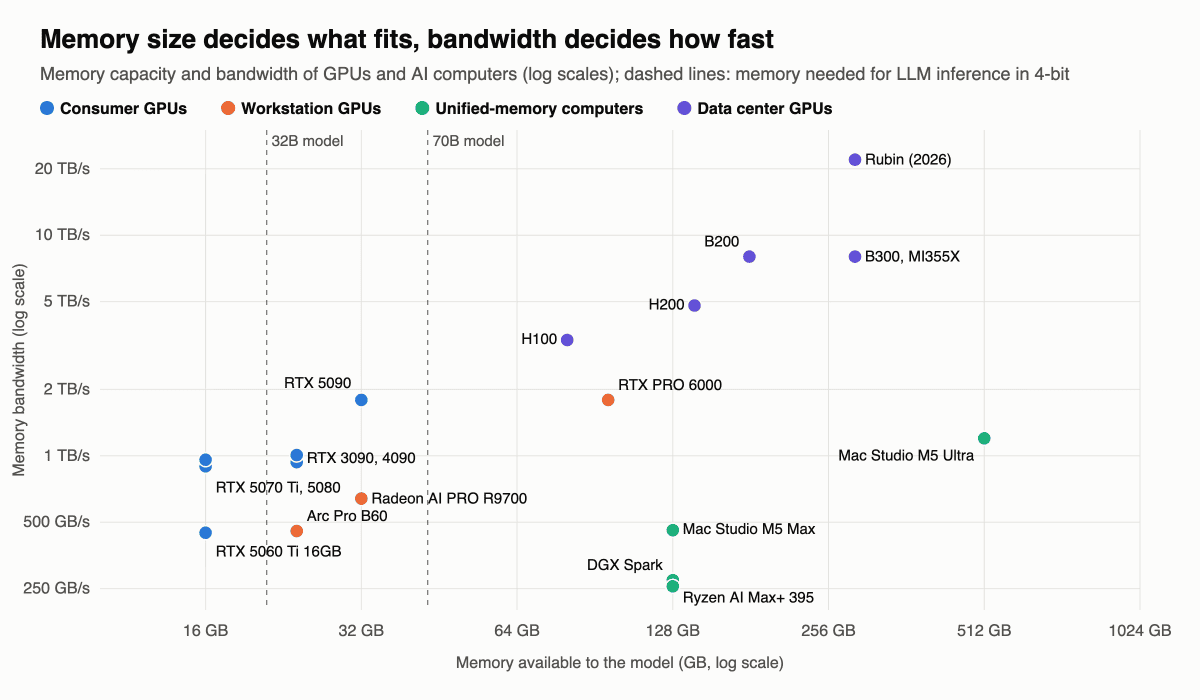
Notice the three clusters. Consumer GPUs are fast but small, 16 to 32 GB. Unified-memory computers such as NVIDIA DGX Spark, AMD Ryzen AI Max+ systems and Mac Studio offer 128 to 512 GB but with lower bandwidth, so huge models fit but generate tokens slowly. Data center GPUs combine both, at a price that puts them mostly in the cloud.
How Much VRAM Do You Need?
For inference, memory is roughly the size of the weights, which is the number of parameters times the bytes per parameter (2 for FP16, 1 for 8-bit, about 0.55 for common 4-bit formats), plus the KV cache, which grows with context length. For training with the Adam optimizer in mixed precision you need about 16 bytes per parameter for weights, gradients and optimizer states, plus activations. The script below makes these estimates and shows why bandwidth caps generation speed:
# Rough GPU memory estimate for running and fine-tuning a Transformer language model
GB = 1024 ** 3

def inference_gb(params_b, bits, layers, kv_heads, head_dim, context, batch=1):
    weights = params_b * 1e9 * bits / 8                                  # model weights
    kv_cache = 2 * layers * kv_heads * head_dim * context * batch * 2    # keys and values in FP16
    return (weights + kv_cache) * 1.1 / GB                               # +10% for activations and runtime

def full_finetune_gb(params_b):
    # FP16/BF16 weights and gradients + FP32 master weights and two Adam moments = 16 bytes per parameter,
    # before activations
    return params_b * 1e9 * 16 / GB

models = {                       # params (billions), layers, KV heads, head dim (Llama 3 style with GQA)
    "8B":  (8, 32, 8, 128),
    "32B": (32, 64, 8, 128),
    "70B": (70, 80, 8, 128),
}
print("model  16-bit   8-bit   4-bit   (inference, 8K context)   full fine-tuning with Adam")
for name, (p, layers, kv, hd) in models.items():
    row = [inference_gb(p, bits, layers, kv, hd, 8192) for bits in (16, 8, 4.5)]
    print(f"{name:>4}  {row[0]:6.0f} GB {row[1]:5.0f} GB {row[2]:5.0f} GB {'':26}{full_finetune_gb(p):6.0f} GB")

# Generating one token reads all the weights once, so memory bandwidth caps the speed
weights_gb = 32 * 4.5 / 8          # a 32B model in a 4-bit format (about 4.5 bits per weight with scales): 18 GB
for gpu, bandwidth in [("DGX Spark", 273), ("RTX 3090", 936), ("RTX 5090", 1792), ("H200", 4800)]:
    print(f"{gpu:10s} {bandwidth:5d} GB/s -> at most {bandwidth / weights_gb:4.0f} tokens/s for a 32B 4-bit model")
model 16-bit 8-bit 4-bit (inference, 8K context) full fine-tuning with Adam
8B 17 GB 9 GB 6 GB 119 GB
32B 68 GB 35 GB 21 GB 477 GB
70B 146 GB 74 GB 43 GB 1043 GB
DGX Spark 273 GB/s -> at most 15 tokens/s for a 32B 4-bit model
RTX 3090 936 GB/s -> at most 52 tokens/s for a 32B 4-bit model
RTX 5090 1792 GB/s -> at most 100 tokens/s for a 32B 4-bit model
H200 4800 GB/s -> at most 267 tokens/s for a 32B 4-bit modelPractical rules of thumb:
- 8 to 12 GB: learning, classic computer vision with CNNs, small LLMs up to about 8B in 4-bit, image generation with smaller diffusion models.
- 16 GB: 8B to 14B LLMs, most image generation, fine-tuning small models with LoRA.
- 24 to 32 GB: 32B LLMs in 4-bit, QLoRA fine-tuning of 8B to 32B models, larger image and video models.
- 48 to 128 GB: 70B models and mixture-of-experts models with 100B+ total parameters in 4-bit.
- Full training or fine-tuning of 7B+ models: 80 GB data center GPUs, usually several of them, which is cloud territory.
Techniques such as LoRA and QLoRA, gradient checkpointing, 8-bit optimizers and FSDP sharding reduce training memory a lot, which is why a single 24 GB card can fine-tune models that would need hundreds of gigabytes for full training.
Best GPUs for AI in 2026
The table lists the most relevant options as of late October 2026. Launch prices are official MSRPs; street prices moved a lot in 2026, see the note below the table.
| GPU or system | Memory | Bandwidth | Launch price | Best for |
|---|---|---|---|---|
| NVIDIA RTX 5060 Ti 16GB | 16 GB GDDR7 | 448 GB/s | $429 | Entry level, learning, small LLMs, image generation |
| NVIDIA RTX 5070 Ti | 16 GB GDDR7 | 896 GB/s | $749 | Fast 16 GB card for training small and medium models |
| NVIDIA RTX 5080 | 16 GB GDDR7 | 960 GB/s | $999 | Speed, but memory is the limit |
| NVIDIA RTX 3090 (used) | 24 GB GDDR6X | 936 GB/s | $1,499 in 2020 | Cheapest 24 GB NVIDIA card, popular for local LLMs |
| NVIDIA RTX 4090 | 24 GB GDDR6X | 1,008 GB/s | $1,599 | Fast 24 GB card, now mostly used |
| NVIDIA RTX 5090 | 32 GB GDDR7 | 1,792 GB/s | $1,999 | The fastest consumer GPU for AI |
| Intel Arc Pro B60 | 24 GB GDDR6 | 456 GB/s | about $599 | Budget 24 GB inference |
| AMD Radeon AI PRO R9700 | 32 GB GDDR6 | 640 GB/s | $1,299 | 32 GB with ROCm, multi-GPU workstations |
| NVIDIA RTX PRO 6000 Blackwell | 96 GB GDDR7 | 1,792 GB/s | about $8,500 | Professional workstations, 70B+ models on one card |
| NVIDIA DGX Spark | 128 GB unified | 273 GB/s | $3,999, now $4,699 | Developing for NVIDIA’s AI stack, big models at modest speed |
| AMD Ryzen AI Max+ 395 systems | up to 128 GB unified | 256 GB/s | varies by vendor | Affordable large-memory inference |
| Apple Mac Studio M5 Max / M5 Ultra | up to 128 / 512 GB unified | 460 GB/s / 1.2 TB/s | from $2,499 / $5,499 | Very large models locally with MLX or llama.cpp |
| NVIDIA H100 / H200 | 80 / 141 GB HBM | 3.35 / 4.8 TB/s | H100 about $25,000 to $40,000; H200 sold in servers | Training and serving in data centers, mostly rented |
| NVIDIA B200 / B300 | 180 / 288 GB HBM3e | 8 TB/s | $30,000+, sold in servers | Current-generation large-scale training |
| AMD Instinct MI355X | 288 GB HBM3e | 8 TB/s | sold in servers | Large-model inference and training on ROCm |
About 2026 prices. Demand for memory from AI data centers has caused a global DRAM shortage since late 2025, and graphics cards, which carry large amounts of GDDR memory, have been hit hard. NVIDIA raised the price of DGX Spark from $3,999 to $4,699 in February 2026 because of memory supply constraints, and its own store listed the RTX PRO 6000 at $16,000 in August 2026, almost twice its launch price. Consumer cards rose too: by August, RTX 5070 Ti cards cost around $1,050 to $1,100 and RTX 5090s around $4,400 to $4,700, and by September and October the cheapest RTX 5090 listings on marketplaces were above $6,000. The RTX 50 Super refresh with more memory was reportedly postponed indefinitely, and the next-generation RTX 60 series is rumored for 2027 at the earliest. AMD Radeon cards rose less. Before buying, compare current prices; at these levels, a used RTX 3090 or renting cloud GPUs is often the better deal.
At the top of the market, NVIDIA’s next data center generation, Vera Rubin, is scheduled to start shipping in the third quarter of 2026, with volume ramping at the end of the year. Each Rubin GPU has 288 GB of HBM4 with about 22 TB/s of bandwidth, almost three times that of Blackwell. AMD answers with the Instinct MI400 series and its Helios racks, with 432 GB of HBM4 per GPU, ramping in the second half of 2026. These will reach most users through cloud providers.
Recommendations by Budget and Use Case
- Just learning deep learning: start free with Google Colab or Kaggle notebooks, which provide NVIDIA T4 GPUs with 16 GB. If you buy, an NVIDIA card with 12 to 16 GB, such as a used RTX 3060 12GB or an RTX 5060 Ti 16GB, is plenty for courses and classic models.
- Running LLMs locally on a budget: a used RTX 3090 is still the most popular choice for its 24 GB and high bandwidth. The Intel Arc Pro B60 offers 24 GB for less money but runs slower, and needs more setup.
- Serious local AI on one consumer card: the RTX 5090 with 32 GB and 1.8 TB/s is the fastest option, and runs 32B models in 4-bit at high speed. At late 2026 prices it is hard to justify unless you need the speed; two used RTX 3090s give 48 GB for less.
- Kaggle, computer vision and tabular deep learning: an RTX 5070 Ti or similar 16 GB NVIDIA card. These workloads need speed more than huge memory.
- The largest open models at home: a Mac Studio with M5 Ultra and up to 512 GB of unified memory, or a 128 GB DGX Spark or Ryzen AI Max+ system. They fit models that no consumer GPU can, but generate tokens several times slower than a GPU with the same model in memory, and they are weaker for training.
- Professional workstation: RTX PRO 6000 Blackwell with 96 GB, or several Radeon AI PRO R9700 cards with 32 GB each for a lower budget on ROCm.
- Training large models or fine-tuning beyond a single card: rent H100, H200 or B200 GPUs in the cloud by the hour instead of buying.
For image generation, the same logic applies: 12 GB is enough for older Stable Diffusion models, 16 to 24 GB is comfortable for current image models and LoRA training, and video generation models want 24 GB or more.
Buy or Rent: Cloud GPUs
Buying makes sense when you use a GPU every day; renting makes sense for occasional large jobs, for GPUs you could not afford to buy and for scaling to many GPUs at once. Indicative on-demand prices per GPU-hour in autumn 2026:
- H100 80GB: about $1.40 to $2 on GPU marketplaces, $3 to $5 on specialized AI clouds, and $6 to $12 on AWS, Google Cloud and Azure.
- H200 141GB: roughly $4 to $6 on specialized clouds.
- B200: roughly $5 to $8.50 on specialized clouds, cheaper with spot or long-term reservations.
- RTX PRO 6000 and RTX 4090/5090 class: often under $2 per hour, a good option for inference and smaller fine-tuning.
Cloud prices also rose in 2026; for example, Nebius raised its on-demand H100 price from $3.85 to $4.50 and its B200 price from $7.15 to $8.50 per hour from October 1, 2026. A simple break-even check: if a GPU costs $2,500 and the equivalent cloud instance $0.70 per hour, buying pays off after about 3,500 hours of use, around five months of continuous training, before electricity.
Multiple GPUs, Power and Cooling
Several GPUs let you train faster, fit larger models by splitting them across cards, or simply run several experiments in parallel, which is valuable on its own. For data-parallel training of CNNs, two GPUs give close to a 1.9x speedup and four GPUs about 3.5x; LLM inference with tensor parallelism also scales well. Consumer cards since the RTX 40 series have no NVLink, so GPUs communicate over PCIe, which slows down training that needs a lot of communication. Make sure your motherboard provides enough PCIe lanes.
The most common mistakes when buying a GPU for AI are still the same as years ago: paying for speed when memory is the bottleneck, not having enough memory, and poor cooling. A modern high-end card draws 450 to 600 W. Use a quality power supply with headroom and the right 12V-2×6 cables, and keep cards cool: an overheating GPU throttles and can lose 20 to 30% of its speed. If you stack several cards next to each other, blower-style cards or a server or open-frame case work better than open-air coolers that blow hot air at the neighboring card.
How the Advice Has Changed Since 2018
When we first published this guide in Russian in 2018, based on Tim Dettmers’ well-known analysis, the recommendation was an RTX 2070, or a cheap GTX 10-series card on a tight budget, and 8 to 11 GB of memory was considered enough for almost any research. The charts below are from that analysis:
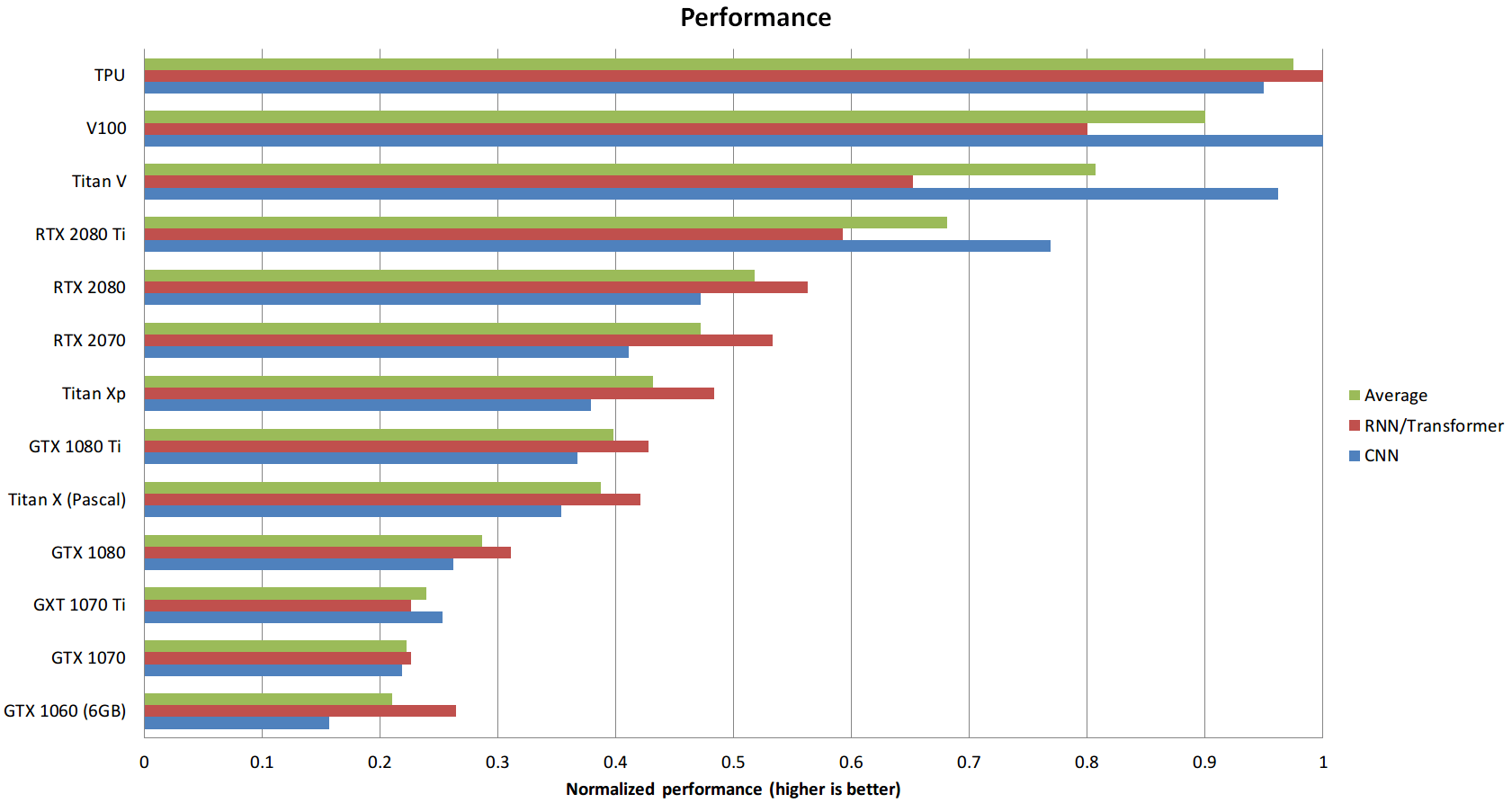
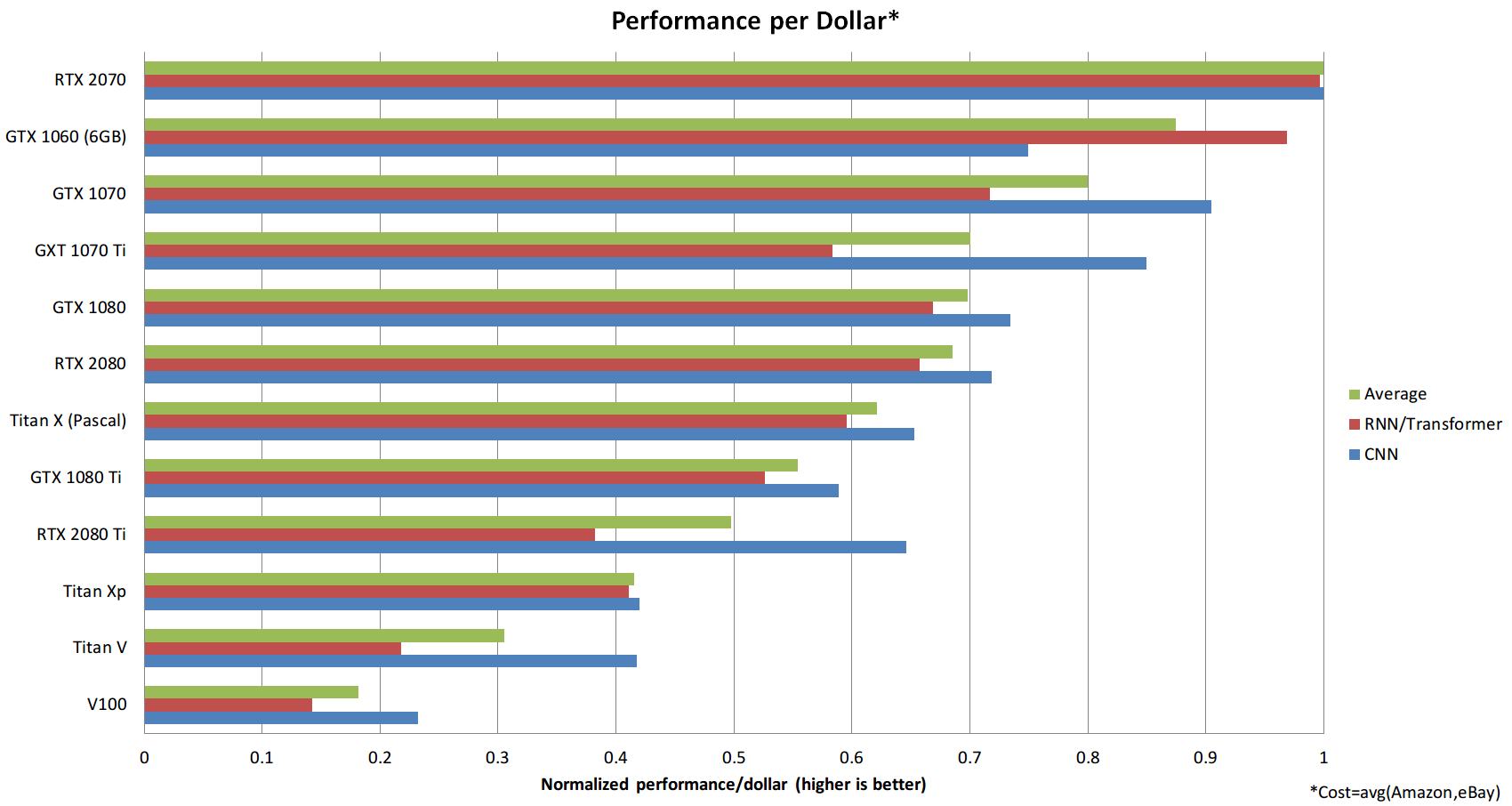
Two things from that time still hold: Tensor Cores and low-precision training are worth having, and performance per dollar matters more than peak performance. What changed is the importance of memory. Large language models made capacity the first question, memory bandwidth the second, and pure compute the third, and the arrival of unified-memory computers and a worldwide memory shortage made the market far less predictable than it was in the GTX and early RTX era.
FAQ
What is the best GPU for AI in 2026?
For a single consumer card, the NVIDIA RTX 5090 with 32 GB is the fastest. For the best value, a used RTX 3090 with 24 GB remains popular. For large models on one card, the RTX PRO 6000 with 96 GB; for the largest models at home, a Mac Studio with up to 512 GB of unified memory. For training at scale, data center GPUs such as the H100, H200 and B200, usually rented in the cloud.
How much VRAM do I need for deep learning?
12 to 16 GB is enough for learning and most classic computer vision and NLP projects. For local LLMs, 24 GB runs 32B models in 4-bit and 48 GB or more is needed for 70B models. Full fine-tuning of large models needs data center GPUs.
Is NVIDIA or AMD better for AI?
NVIDIA has the most mature software, CUDA, and almost every AI tool supports it first. AMD’s ROCm now works with PyTorch, vLLM and llama.cpp on recent Radeon and Instinct GPUs and often offers more memory for the money, but you should expect more setup and occasional compatibility issues.
Can I use a gaming GPU for machine learning?
Yes. GeForce RTX cards are excellent for deep learning and are what most individual researchers and students use. Workstation cards mainly add more memory, certified drivers and better cooling for multi-GPU setups.
Is a Mac good for AI?
For running large LLMs locally, yes: Apple Silicon’s unified memory lets a Mac Studio hold models that would need several GPUs, and MLX and llama.cpp run them well. For training, NVIDIA GPUs are much faster and better supported.
Is a GPU necessary for machine learning?
Not for classic machine learning such as linear regression, decision trees or gradient boosting, which run well on a CPU. For deep learning, a GPU speeds up training by one to two orders of magnitude, and it is essential for running modern LLMs at a usable speed.
Should I buy a GPU or use the cloud?
Buy if you will use it most days for months; rent if you need a lot of compute occasionally, need GPUs larger than you can afford, or want to try ideas before investing. Many people combine a local card for development with cloud GPUs for big runs.
See also: our guides to epochs, batch size and iterations, which explains how batch size relates to GPU memory, and to gradient descent.